Updated · By Peter Kovalsky
How to End a Presentation: 8 Ways, With Examples

To end a presentation well, do four things in under a minute: signal that you are finishing, sum up your main point in one or two sentences, tell people the one thing to do or remember, and finish on a short last line, then stop and pause. If you take questions, take them before that last line, so the final words in the room are yours and not the last question’s.
The rest of this page gives eight ways to close, with example lines you can adapt for a class presentation, a pitch or a team meeting, plus how to run Q&A at the end, what to put on your last slide and the mistakes that make an ending fall flat.
How do you end a presentation?
Most good endings follow the same four steps, whatever the topic. The words change; the order doesn’t.
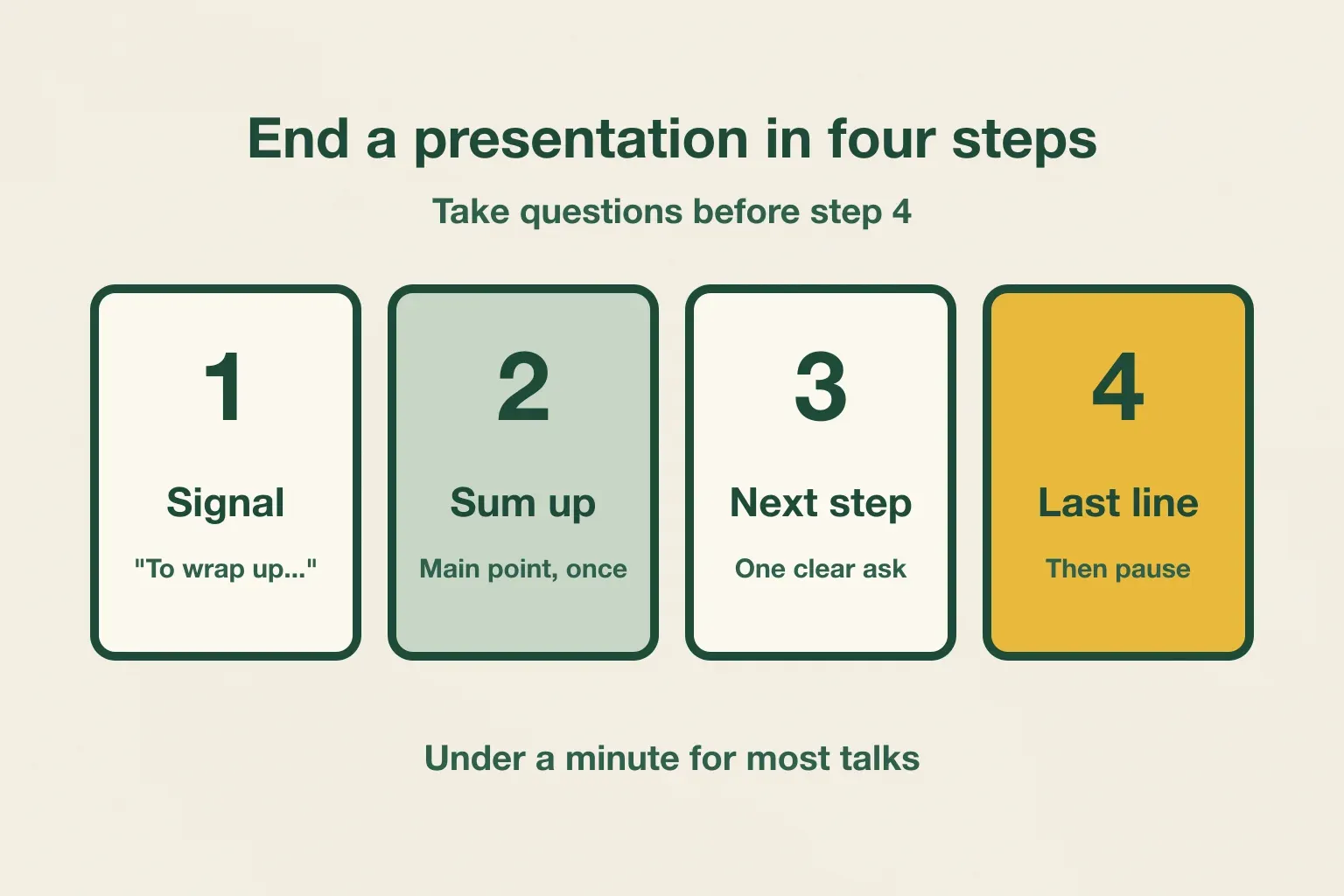
- Signal the end. Say it plainly: “To finish…”, “So, to wrap up…”, “One last thing before we stop.” People who drifted off in the middle start listening again when they hear the end is near. It also stops you from ending so suddenly that the room isn’t sure you’re done.
- Sum up the main point. One or two sentences, not a replay of every slide. If you had three points, name all three in a line: “Plants need light, water and the right soil.” If you had one argument, say it again in different words from the opening.
- Give one next step. What should people do, decide or remember? Make it one thing, and make it concrete: “Sign up by Friday”, “Approve the budget today”, “Try this on your next essay.” Two or three asks usually means none of them happen.
- Last line, then pause. End on a short sentence you have practised word for word. Then stop talking, look at the audience and count two seconds before you say “Thank you” or move. The pause tells people it’s over, and it’s when they clap.
Write the ending first, or at least before you finish your slides. If you know where the talk lands, it’s easier to cut the middle when you run short of time.
8 ways to end a presentation, with examples
Pick the closing type that fits your goal. You can combine two (for example, a summary followed by a call to action); more than two starts to feel like several endings.
| Closing type | Best when you want people to… | Works well for |
|---|---|---|
| Summary | Remember the main points | Class presentations, training, reports |
| Call to action | Do one thing next | Pitches, proposals, fundraising |
| Q&A, then a final close | Ask what’s still unclear | Team updates, lectures, demos |
| Callback to the opening | Feel the talk has come full circle | Talks that open with a story or question |
| A question to the audience | Think about it afterwards | Persuasive talks, workshops |
| A quote | Leave with someone else’s words | Speeches, motivational talks |
| A picture of the future | See what changes if they act | Pitches, strategy, project kickoffs |
| A short story or result | Believe it works | Case studies, sales, demos |
1. Summary: “If you remember three things…”
The summary is the safest ending and the one most teachers expect in a school presentation. Keep it to the main points and say them in a single breath, not one slide each.
- Class presentation: “So, the three causes of the First World War we looked at were alliances, the arms race and nationalism. Without any one of them, the assassination might have stayed a local crisis.”
- Training session: “If you remember three things from today: lock your screen, check the sender before you click, and report anything odd to IT.”
- Report: “In short: sales are up 8%, costs are flat, and the one risk is the delay at the supplier.”
Make it stronger by ending on the most important point, not just the last one you covered.
2. Call to action: “Here’s what I’m asking you to do”
A call to action tells people exactly what to do next, by when and how. It’s the right ending for any presentation that exists to get a decision, a sign-up or a yes.
- Pitch: “We’re asking for a pilot with one team for six weeks. If it works, you’ll have the numbers to roll it out. Can we agree on a start date today?”
- Internal proposal: “I need a yes or no on the new booking tool by Friday, so we can switch before the busy season.”
- School club or charity: “The sign-up sheet is by the door. Put your name down for one Saturday this term.”
Say the ask out loud, even if it’s on the slide. Then stop: don’t soften it with “but no pressure” or “only if you want to.”
3. Q&A, then a final close
Many presentations end with questions. The mistake is letting the last question end the talk: it might be off-topic, or one you can’t answer well, and the room remembers that. Instead, do your summary first, take questions, then come back with one closing line.
- Before Q&A: “Before I wrap up, I’d love to hear your questions.”
- After Q&A: “Thanks for those questions. So, to finish where we started: if we fix onboarding first, everything else gets easier. Thank you.”
There is more on running Q&A well in the section below.
4. Callback to the opening
If you opened with a story, a question or a surprising number, return to it at the end. It gives the talk a shape the audience can feel, and it’s easy to remember on the day because your opening already set it up.
- Opened with a story: “Remember Maya, who missed her bus every day for a month? With the new timetable, she hasn’t missed one since.”
- Opened with a question: “At the start I asked how many hours a week you spend on your phone. Most of you guessed under ten. The class survey said twenty-two.”
- Opened with a number: “We began with 40 minutes: the time a customer waits today. With this change, it’s four.”
Plan this when you write your presentation opening: write the first and last line together.
5. A question to the audience
End with a question you don’t expect people to answer out loud. It works when you want them to keep thinking after they leave, which suits persuasive talks and workshops.
- “Next time you buy a phone, will you ask where it was made?”
- “If we started this project again tomorrow, what’s the one thing you’d do differently?”
- “What would your school look like if every student had a say in the rules?”
Pause after the question. If you rush to “Thank you” straight away, it sounds like you didn’t mean it.
6. A quote
A short quote can say your point better than you can, especially in a speech or motivational talk. Keep it short (one sentence), say who said it, and make sure it actually connects to your point. Check the source: many popular quotes are misattributed, and a teacher or client may notice.
- “Benjamin Franklin wrote, ‘Well done is better than well said.’ So let’s stop talking about the new timetable and try it next week.”
Avoid a quote that everyone has heard on every poster. A line from someone in the room’s own world (a customer, a scientist in your topic, a character from the book you studied) lands better.
7. A picture of the future
Describe what will be different if people act on what you said. This is the “vision” close used in pitches and strategy talks, and it works because it makes the call to action feel worth it.
- Pitch: “Imagine next year’s open day: every visitor gets a map on their phone, and nobody asks where the library is.”
- Team update: “By March, every order ships the same day. That’s what these three changes get us.”
Keep it concrete and believable. A picture people can see beats a big claim they can’t check.
8. A short story or result
End with one real example that proves your point: a customer, a test, a classmate’s experience. Stories stick far better than a summary slide, and they make your call to action credible.
- Case study: “Last month we tried this with the Leeds office. They cut their reporting time from a day to two hours. That’s what we’re asking for here.”
- Science project: “When we watered half the plants with salt water, all of them were dead by day ten. That’s why the coastal farms need a different crop.”
Keep the story short (30 to 60 seconds) and tell it in the order it happened.
How to handle Q&A at the end of a presentation
Q&A is part of the ending, so plan it like the rest of the talk.
- Say when you’ll take questions at the start: “I’ll take questions at the end.” People hold them instead of interrupting.
- Do your summary before Q&A, and keep one closing line for after it. If time runs out, you can skip Q&A and still end well.
- Repeat or rephrase each question before you answer. Everyone hears it, and you get a few seconds to think.
- If nobody asks, have one ready: “A question I often get is…” Or ask the room one: “Which of these three would you try first?”
- If you don’t know the answer, say so and offer to follow up: “Good question. I don’t know, and I’ll find out and email you by Monday.”
- Give a time limit and keep to it: “We have time for two more questions.”
Many people won’t put their hand up in front of a room, especially students and new team members. Letting them ask from their phones gets you more questions and better ones. With Copresent’s Audience Q&A, you show a QR code on your Google Slides for 30 seconds, a minute, two minutes or until you hide it. People ask from their phone’s browser, with no app or account, by name or anonymously, and vote on each other’s questions. Each question is tagged with the slide that was showing when it was sent, and you read, answer, pin or hide them from your phone or laptop while you present. You can pause new questions when you start your final close.
What to put on the last slide
Your last slide stays on screen during Q&A and while people pack up, so it may be the slide they look at longest. Use it.
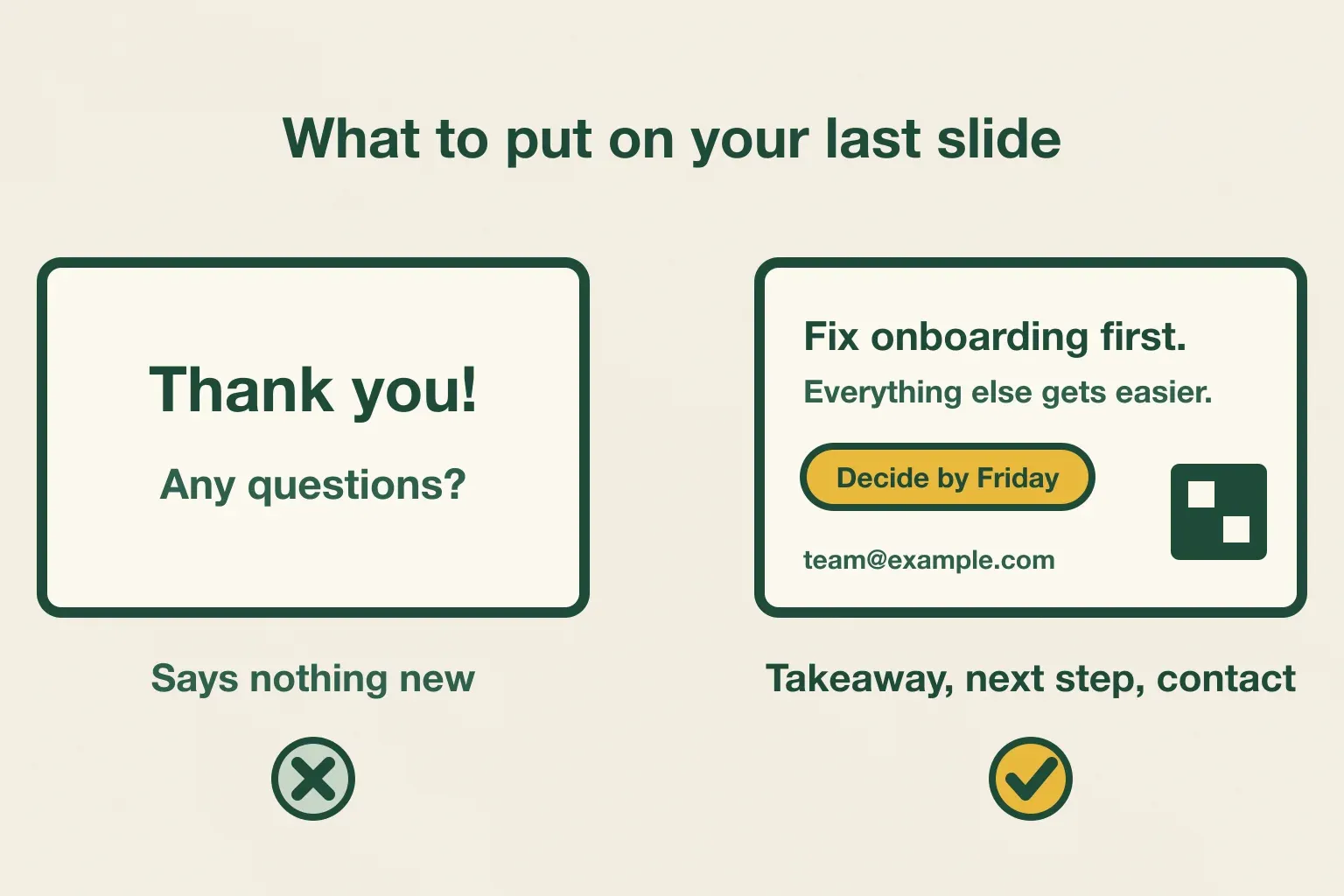
- Your main point in one line, in big text. The thing you want people to remember.
- The one next step: a link, a date, a sign-up, a decision.
- How to reach you, if it matters: an email, a short link, or a QR code to the document or form.
A slide that says only “Thank you!” or “Any questions?” wastes that time. You will say thank you anyway; the slide can work harder.
In Google Slides, end on that slide and stay on it during Q&A, rather than clicking past it or leaving the slideshow, so the room doesn’t end up looking at your editor or your email. If you present from your phone with the Google Slides remote, slide previews show which slide is on screen, so you know you’re on the last one without turning around. Your speaker notes on your phone are a good place for your exact last line.
How long should the ending be?
As a rule of thumb, the ending is about 5 to 10% of your time, and never less than about 30 seconds. Q&A is extra, unless your time limit includes it: check with the teacher or organizer.
| Talk length | Ending (without Q&A) | What fits |
|---|---|---|
| 2 to 3 minutes | 15 to 30 seconds | One summary sentence and a last line |
| 5 minutes | 30 to 45 seconds | Summary, one next step, last line |
| 10 minutes | About 1 minute | Summary, call to action or story, last line |
| 20 minutes | 1 to 2 minutes | Summary, short story or vision, call to action |
| 45 to 60 minutes | 2 to 4 minutes | Full recap, story, call to action, final line after Q&A |
Mark the point in your notes where the ending must start, for example “3:00 left: start the close.” If you’re behind, cut a middle section, not the ending. A presentation timer or a timer in Google Slides helps you see when to start, and the speech time calculator shows how many words fit in the time you have.
Phrases to end a presentation
Use these to signal the end, sum up and close. Pick one from each group rather than all of them.
To signal the end
- “To wrap up…”
- “So, to finish…”
- “Before I stop, one last thing.”
- “That brings me to the end.”
To sum up
- “In short…”
- “If you remember one thing from today, make it this:”
- “So, the three things we looked at were…”
- “The main point is simple:”
To move to questions
- “I’d be happy to take your questions.”
- “What questions do you have?” (it invites more answers than “Any questions?”)
- “We have five minutes for questions.”
To close after questions
- “Thanks for those questions. To finish where we started…”
- “Let me leave you with this:”
- “Thank you for listening.”
For English learners: “In conclusion” is correct, but it can sound formal in a short talk. “To sum up” or “So, to finish” sounds more natural when you speak.
Example endings you can adapt
These are written examples, not from real presentations. Change the details to fit yours.
A 5-minute class presentation on recycling (summary and question)
“So, to wrap up. Only about a third of our school’s rubbish gets recycled, mostly because people aren’t sure which bin to use. Three changes would fix most of that: clearer labels, a bin in every classroom and a monthly reminder in assembly. Next time you’re standing in front of the bins, ask yourself: do I actually know where this goes? Thank you.”
A 10-minute pitch to a manager (story and call to action)
“To finish. Last month the support team tested the new chat tool for two weeks. Their response time fell from four hours to forty minutes, and nobody worked late. I’m asking for approval to roll it out to the whole team in January. If we agree today, I’ll have it set up before the holidays. Thank you.”
A 15-minute team update (Q&A, then a final close)
Before Q&A: “That’s the update: we’re on track for launch, and the one risk is testing time. Before I finish, what questions do you have?”
After Q&A: “Thanks, those were useful. So, one thing to take away: if you find a bug, log it by Thursday, not Friday. That’s what keeps us on track. Thank you, everyone.”
Mistakes to avoid when ending a presentation
- Ending suddenly. “And… that’s it.” Always signal the end and use a planned last line.
- Apologizing. “Sorry, I ran out of time” or “Sorry if that was boring.” It’s the last thing people remember. Cut, don’t apologize.
- Adding new information. The ending isn’t the place for a point you forgot. If it matters, it belonged in the middle.
- Several endings. “To wrap up…” followed by three more minutes. Once you signal the end, finish within a minute.
- Letting Q&A end the talk. Always come back with a closing line after the last question.
- Reading the ending off the slide. Learn your last two sentences by heart, look at the audience, and say them.
- Rushing off. Stay in place, pause, and let people react. Walking away mid-sentence makes the ending feel like an escape.
Practise the ending out loud more than any other part. You’ll be most nervous at the start and most tired at the end, and a line you know by heart still comes out right. If you’re presenting with a partner or a group, agree who says the last line, and practise the handover; our co-presenting tips cover handoff signals.
Frequently asked questions
How do you end a presentation?
Signal that you’re finishing, sum up your main point in one or two sentences, tell people the one thing to do or remember, then finish with a short last line and pause. Take questions before that last line.
What is a good closing line for a presentation?
A short sentence that repeats your main point or your ask in a memorable way, for example “If we fix onboarding first, everything else gets easier.” Practise it word for word so it comes out right.
Should you say “thank you” at the end of a presentation?
Yes, but say it after your last line, not instead of it. “Thank you” tells people you’re done; it shouldn’t be the only thing they remember.
Should the last slide say “Thank you” or “Questions?”
It’s better to show your main takeaway, the one next step and how to reach you. The last slide stays up during Q&A, so give it something useful to show.
How do you end a presentation with Q&A?
Do your summary, take questions, then come back with one closing line after the last answer. That way the talk ends on your point, not on the last question.
How long should the conclusion of a presentation be?
About 5 to 10% of your time, and at least 30 seconds: roughly 30 to 45 seconds for a 5-minute talk and about a minute for a 10-minute one. Q&A is extra unless your time limit includes it.
How do you end a school presentation?
Most teachers expect a summary of your main points and a clear last line. Name your two or three points in one sentence, add why they matter, then finish with a question or a short takeaway and say “Thank you.”